GGUF models
Manage models in the GGUF format within the same operational catalogue.
 Book a discovery session
Model Catalogue
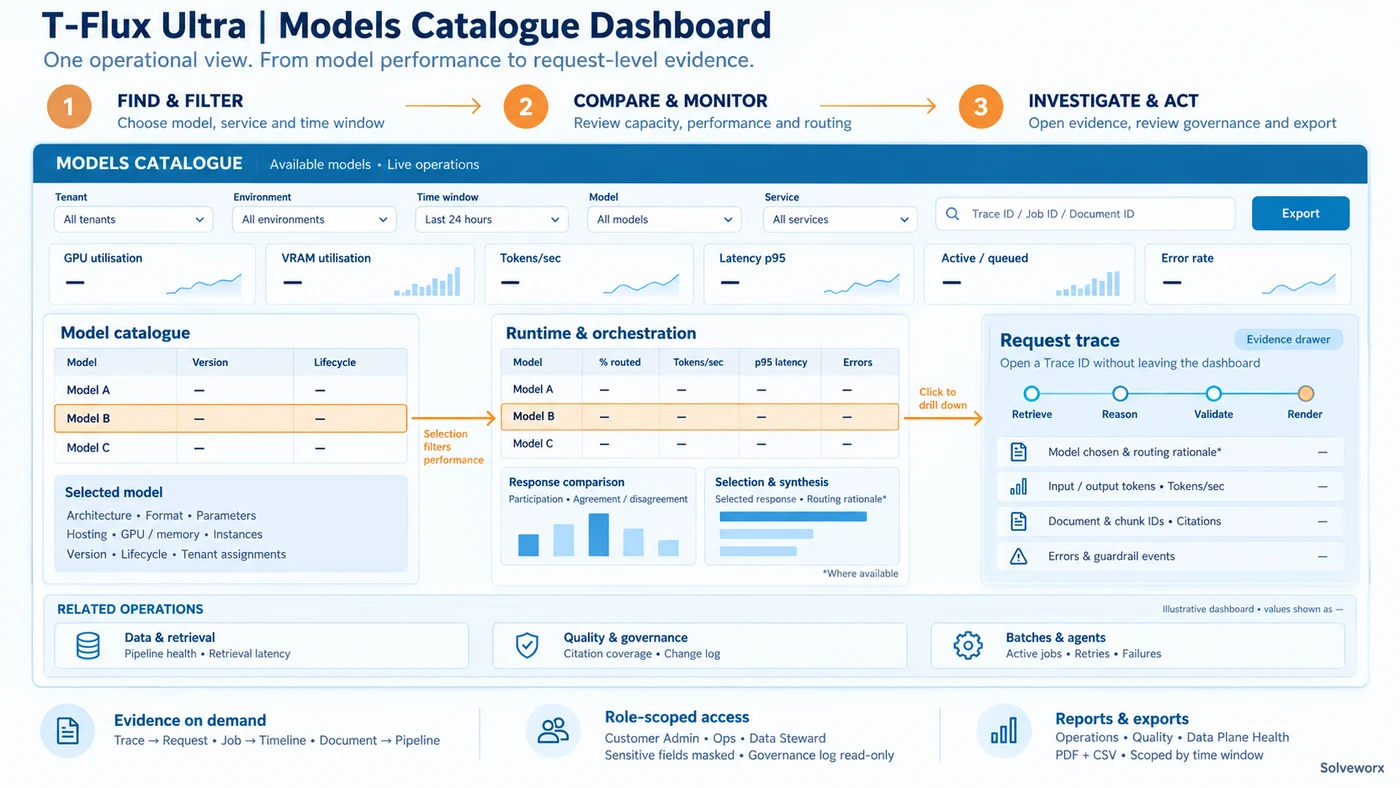
The T-Flux Ultra Model Catalogue provides a central catalogue and operational management view of every AI model available to T-Flux.
It manages AI intelligence resources separately from platform infrastructure and tenant operations, so teams can see what models are available, how they are performing, and how T-Flux is using them.
Flexible by design
The Model Catalogue gives AI administrators, ModelOps teams, platform engineers, and authorised technical administrators a single operational view of compute and models, with fast drill-down to request, job, and document evidence.
Enterprise control
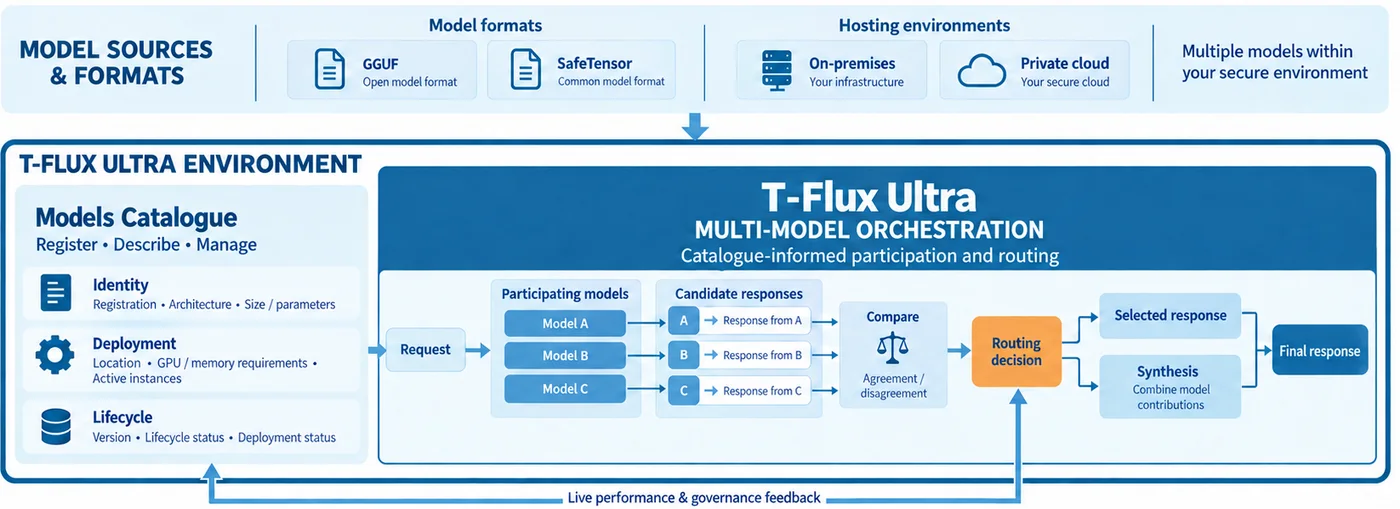
T-Flux Ultra can host and coordinate multiple private or vendor LLMs concurrently, applying proprietary computational selection logic to create an accurate, complete and compliant composite output.
Coordinate multiple LLMs simultaneously and draw on each model’s strengths for more context-relevant responses.
02
Keep data, models and AI workloads within your controlled environment.
03
Ground responses in internal data, policies and governance frameworks.
04
Create specialised, domain-specific models trained on proprietary knowledge and intellectual property.
05
Fixed monthly pricing, cost-capped deployments, predictable operating expenditure and measurable ROI.
Catalogue management
Model type and architecture, format, size and parameter count, version and lifecycle status, deployment status, and hosting location.
GPU and memory requirements, active instances, inference throughput, tokens per second, context-window utilisation, latency, and error rate.
Tenant and model assignments, routing rules, model utilisation, routing decisions, and the role each model plays in an AI request.
Model provenance and approval, versioning, retirement, replacement, and controlled visibility of governance activity.
Multi-model orchestration
For multi-model orchestration, the Model Catalogue shows how models contribute to a request, how their responses compare, and how T-Flux selects or synthesises the final result.
See which models participated in a request and which model produced each candidate response.
Understand model agreement or disagreement, the synthesis process, arbitration time, and which response was selected.
Compare model-specific throughput, tokens per second, GPU seconds per request, latency, error rate, citation coverage, and refusal rate.
Customer benefits
Open formats, supported model families, private endpoints, and customer foundation models give customers flexibility in how they build their AI capability.
Live deployment, performance, resource, and failure measures help AI administrators and ModelOps teams understand model behaviour.
Provenance, approval, versioning, lifecycle status, and role-based visibility keep model decisions reviewable.
Comparison and routing views help teams understand which models deliver the strongest outcome for each request.
Role-based visibility
Customer administrators can view model cards, export reports, and review governance logs. Operations teams can drill into operational cards. Sensitive fields, including API secrets, raw document snippets, and personally identifiable information, are masked by default.